
Verify email authentication and domain records before sending
Inspect SPF syntax, DMARC policies, and DKIM selector status in seconds. MXSentin checks your mail servers, audits DNS propagation, and queries 50+ blocklist databases so outbound messages reach recipient inboxes.
Checks syntax, authorized IPs, and DNS limit.
Verifies enforcement mode (none, quarantine, reject).
Tests mail server priorities and host health.
Checks IP address against 40+ DNSBL feeds.
Featured diagnostic tools
Run targeted checks on your mail infrastructure or generate compliant records for your DNS provider.
MX Checker
Inspect mail routing priority and verify recipient host responsiveness.
DMARC Validator
Verify domain alignment, policy mode, and reporting destination addresses.
SPF Checker
Validate syntax, authorized mechanisms, and the 10-lookup evaluation limit.
Blacklist Monitor
Query over 50 DNSBL and RBL feeds for active IP and domain listings.
BIMI Inspector
Preview brand logo rendering and verify certificate authority validation.
SPF Generator
Configure authorized sending mechanisms and export a validated TXT string.
Header Analyzer
Parse email transport headers to inspect hop latency and authentication results.
Port Tester
Test TCP handshakes across standard mail ports 25, 465, 587, and 993.
Monitor your domain portfolio in one place
Automated checks run on schedule to detect record drift, expired certificates, and blocklist incidents before recipients notice.
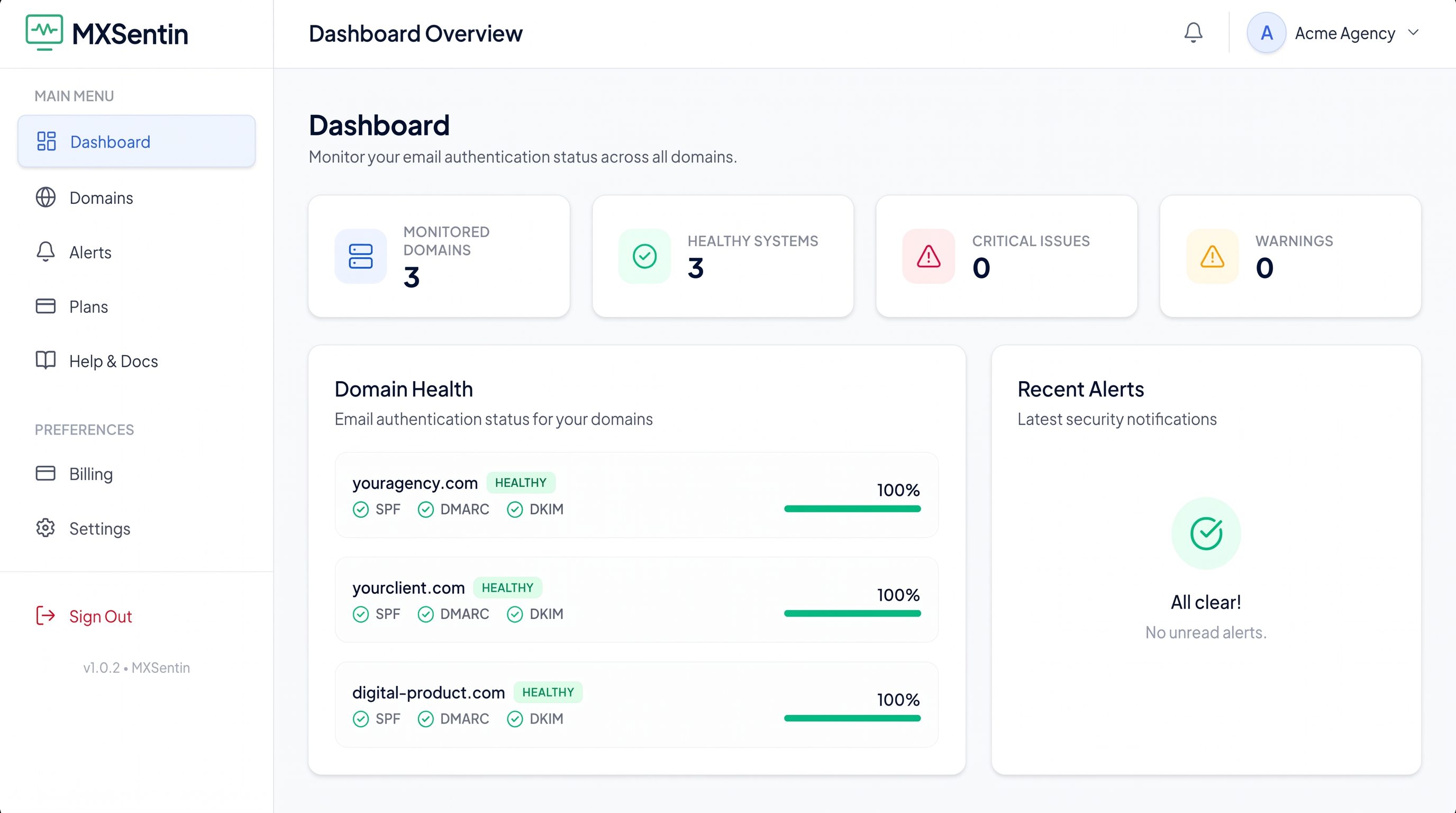
How automated domain monitoring works
MXSentin tracks DNS records and mail server health so you can fix configuration issues before outbound campaigns go out.
1. Add your sending domain
Enter any root domain or subdomain to run an immediate DNS, authentication, and deliverability audit.
2. Automated background verification
Background workers verify SPF mechanisms, DMARC alignment, and mail server connectivity on schedule.
3. Incident alerts
Receive notifications through email or webhook when a record changes or an IP address appears on a blocklist.
Why email authentication matters for inbox placement
Inbox providers filter inbound messages using cryptographic identity and sender reputation. When mail servers cannot confirm that a message originated from your authorized infrastructure, they route your messages to spam or reject them outright. Setting up verified DNS records protects your domain identity from impersonation and maintains reliable email deliverability.
How SPF, DKIM, and DMARC work together
Three core standards establish email authenticity. Sender Policy Framework (SPF) lists the IP addresses permitted to transmit messages for your domain. DomainKeys Identified Mail (DKIM) attaches a cryptographic signature to each outgoing header, proving the content was not altered in transit. DMARC instructs recipient servers how to handle messages that fail either check.
Why DNS blocklists damage domain reputation
Mailbox providers consult DNS-based blacklists (DNSBLs and RBLs) to filter known sources of spam and compromised servers. An IP address or domain can end up on a blocklist due to shared hosting neighbors or sudden volume spikes. Regular blacklist monitoring detects listings early so you can request delisting before campaign deliverability drops.
Proactive monitoring versus reactive troubleshooting
DNS records drift over time. Third-party SaaS providers change sending IP ranges, team members edit DNS zones without testing syntax, and SSL certificates expire without warning. Automated verification runs background checks across mail exchanger priorities, TLS certificates, and authentication records around the clock.
Frequently asked questions about email deliverability and domain security
Clear answers to common questions about mail records, authentication errors, and sender reputation.
Why do legitimate emails land in the spam folder even when SPF passes?
SPF only verifies that the sending server is authorized by the domain in the envelope Return-Path. If your From header domain does not match the envelope domain, DMARC alignment fails. In addition, mailbox providers evaluate recipient engagement, complaint rates, spam filter heuristics, and IP reputation alongside DNS authentication records.
What happens if a sending IP address appears on an email blacklist?
When a sending IP appears on a major DNSBL (such as Spamhaus, Barracuda, or Invaluement), receiving mail servers may reject your SMTP connections or route all messages from that IP directly to recipient junk folders. Monitoring blacklist status allows domain owners to mitigate compromised mailboxes and submit removal requests promptly.
What is the difference between DMARC policy none, quarantine, and reject?
A p=none policy tells mailbox providers to deliver messages normally while sending aggregate XML reports to the domain owner. This mode helps you audit legitimate sending services. A p=quarantine policy directs receiving servers to send unauthenticated messages to the spam folder. A p=reject policy instructs receivers to reject unauthenticated mail entirely, providing maximum domain security against phishing and spoofing.
What is the SPF 10-lookup limit and how do you resolve it?
The SPF specification (RFC 7208) limits DNS mechanisms that require DNS queries (such as include, a, mx, and redirect) to a maximum of 10 lookups per evaluation. Exceeding this limit causes mailbox providers to return a PermError, which causes SPF authentication to fail. You can resolve this by removing unused vendor includes or consolidating direct IP addresses.
How often should automated domain health checks run?
Critical authentication records (SPF, DKIM, and DMARC) and MX routing should be checked at least daily, or hourly for high-volume senders. Blacklist databases update continuously, so active outbound senders benefit from frequent scans to catch blocklist incidents before scheduled email campaigns begin.
Plans for individuals and teams
Start monitoring one domain for free. Upgrade to increase check frequency, connect Slack notifications, and retain audit logs.
Pro
PopularIdeal for professionals and small teams
Everything in Free +
- Up to 10 monitored domains
- Checks every 15 minutes
- Hourly blacklist scans
- 30 days log history
- Email and Slack alert webhooks
Agency
For agencies and multi-client marketing teams.
Everything in Pro +
- Up to 50 monitored domains
- Checks every 1 minute
- Hourly blacklist scans
- 365 days log history
- White-label audit reports
- Email and Slack alert webhooks
Get Started today:
- 1 monitored domain
- Daily DNS checks (every 24h)
- Daily blacklist queries
- 3 days history retention
- Email incident alerts
Frequently asked questions about pricing
Everything you need to know about our domain monitoring plans and billing.
Can I monitor my domain for free without entering payment details?
Yes. The Starter plan is free forever and requires no credit card. You can track 1 domain with daily DNS, authentication, and blacklist status checks.
How often do automated health checks run on paid plans?
Pro plans run DNS and mail server tests every 15 minutes with hourly blacklist scans. Agency plans run checks every 1 minute for rapid incident detection.
Can I upgrade, downgrade, or cancel anytime?
Yes. You can change your plan or cancel your subscription at any time from your account settings. When you cancel, paid features remain active through your billing period.
What are white-label audit reports in the Agency plan?
White-label reports allow marketing agencies and consultants to export PDF audit reports with custom branding and logos to share directly with domain clients.